3. ROSCO Examples
Methods for reading turbine models, generating the control parameters of a DISCON.IN: file, and running aeroelastic simulations to test controllers
Reading Turbine Models
———————-
Control parameters depend on the turbine model.
The rosco.toolbox uses OpenFAST inputs and an additional .yaml formatted file to set up a turbine object in python.
Several OpenFAST inputs are located in Test_Cases/.
The controller tuning .yaml are located in Tune_Cases/.
A detailed description of the ROSCO control inputs and tuning .yaml are provided in The DISCON.IN file and ROSCO_Toolbox tuning .yaml, respectively.
01_turbine_model.pyloads an OpenFAST turbine model and displays a summary of its information
ROSCO requires the power and thrust coefficients for tuning control inputs and running the extended Kalman filter wind speed estimator.
02_ccblade.pyruns cc-blade, a blade element momentum solver from WISDEM, to generate a \(C_p\) surface.
The Cp_Cq_Ct.txt (or similar) file contains the rotor performance tables that are necessary to run the ROSCO controller.
This file can be located wherever you desire, just be sure to point to it properly with the PerfFileName parameter in DISCON.IN.
3.1. Tuning Controllers and Generating DISCON.IN
The ROSCO turbine object, which contains turbine information required for controller tuning, along with control parameters in the tuning yaml and the \(C_p\) surface are used to generate control parameters and DISCON.IN files.
To tune the PI gains of the torque control, set omega_vs and zeta_vs in the yaml.
Similarly, set omega_pc and zeta_pc to tune the PI pitch controller; gain scheduling is automatically handled using turbine information.
Generally omega_* increases the responsiveness of the controller, reducing generator speed variations, but an also increases loading on the turbine.
zeta_* changes the damping of the controller and is generally less important of a tuning parameter, but could also help with loading.
The default parameters in Tune_Cases/ are known to work well with the turbines in this repository.
03_tune_controller.pyloads a turbine and tunes the PI control gains04_simple_sim.pytunes a controller and runs a simple simualtion (not using OpenFAST)05_openfast_sim.pyloads a turbine, tunes a controller, and runs an OpenFAST simulation
Each of these examples generates a DISCON.IN file, which is an input to libdiscon.*.
When running the controller in OpenFAST, DISCON.IN must be appropriately named using the DLL_FileName parameter in ServoDyn.
OpenFAST can be installed from source or in a conda environment using:
conda install -c conda-forge openfast
ROSCO can implement peak shaving (or thrust clipping) by changing the minimum pitch angle based on the estimated wind speed:
06_peak_shaving.pyloads a turbine and tunes a controller with peak shaving.
By setting the ps_percent value in the tuning yaml, the minimum pitch versus wind speed table changes and is updated in the DISCON.IN file.
ROSCO also contains a method for distributed aerodynamic control (e.g., via trailing edge flaps):
09_distributed_aero.pytunes a controller for distributed aerodynamic control
The ROSCO toolbox also contains methods for working with OpenFAST linear models
* 10_linear_params.py exports a file of the parameters used for the simplified linear models used to tune ROSCO
* 11_robust_tuning.py shows how linear models generated using OpenFAST can be used to tune controllers with robust stability properties.
* 12_tune_ipc.py shows the tuning procedure for IPC
3.2. Running OpenFAST Simulations
To run an aeroelastic simulation with ROSCO, the ROSCO input (DISCON.IN) must point to a properly formatted Cp_Cq_Ct.txt file using the PerfFileName parameter.
If called from OpenFAST, the main OpenFAST input points to the ServoDyn input, which points to the DISCON.IN file and the libdiscon.* dynamic library.
For example in Test_Cases/NREL-5MW:
NREL-5MW.fsthas"NRELOffshrBsline5MW_Onshore_ServoDyn.dat"as theServoFileinputNRELOffshrBsline5MW_Onshore_ServoDyn.dathas"../../ROSCO/build/libdiscon.dylib"as theDLL_FileNameinput and"DISCON.IN"as theDLL_InFileinput. Note that these file paths are relative to the path of the main fast input (NREL-5MW.fst)DISCON.INhas"Cp_Ct_Cq.NREL5MW.txt"as thePerfFileNameinput
The rosco.toolbox has methods for running OpenFAST (and other) binary executables using system calls, as well as post-processing tools in ofTools/.
Several example scripts are set up to quickly simulate ROSCO with OpenFAST:
05_openfast_sim.pyloads a turbine, tunes a controller, and runs an OpenFAST simulation07_openfast_outputs.pyloads the OpenFAST output files and plots the results08_run_turbsim.pyruns TurbSim, for generating turbulent wind inputs14_open_loop_control.pyruns an OpenFAST simulation with ROSCO providing open loop control inputs
3.3. Testing ROSCO
The rosco.toolbox also contains tools for testing ROSCO in IEC design load cases (DLCs), located in ROSCO_testing/.
The script run_Testing.py allows the user to set up their own set of tests.
By setting testtype, the user can run a variety of tests:
lite, which runs DLC 1.1 simulations at 5 wind speed from cut-in to cut-out, in 330 second simulationsheavy, which runs DLC 1.3 from cut-in to cut-out in 2 m/s steps and 2 seeds for each, in 630 seconds, as well as DLC 1.4 simulationsbinary-comp, where the user can comparelibdiscon.*dynamic libraries (compiled ROSCO source code), with either a lite or heavy set of simulationsdiscon-comp, where the user can compareDISCON.INcontroller tunings (and the complied ROSCO source is constant)
Setting the turbine2test allows the user to test either the IEA-15MW with the UMaine floating semisubmersible or the NREL-5MW reference onshore turbine.
3.4. List of Examples
A complete list of examples is given below:
3.4.1. 01_turbine_model
Interact with a ROSCO turbine model:
Read .yaml input file
Load an openfast turbine model
Read text file with rotor performance properties (Cp, Ct, and Cq surface)
Print some basic turbine properties
Save the turbine as a pickle
Plot the Cp surface
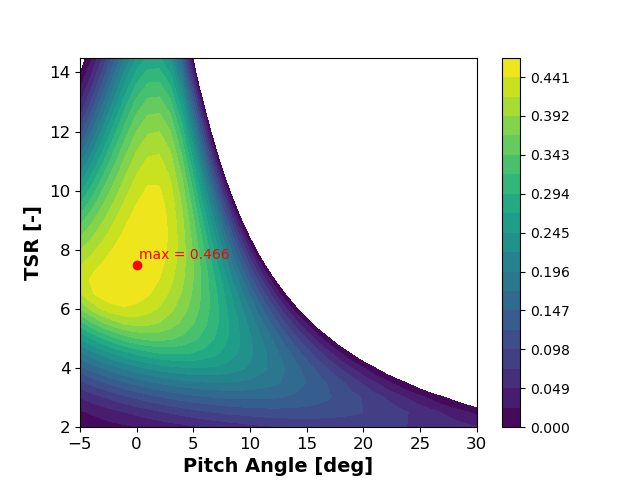
Note: Uses the NREL 5MW included in the Test Cases and is a part of the OpenFAST distribution
3.4.2. 02_ccblade
Run CCblade, save a rotor performance text file. In this example:
Read .yaml input file
Load an openfast turbine model
Run ccblade to get rotor performance properties
Write a text file (
'02_Cp_Ct_Cq.Ex03.txt') with rotor performance properties
3.4.3. 03_tune_controller
Load a turbine model and tune the controller In this example:
Read a .yaml file
Create a ROSCO turbine object fromt he OpenFAST model
Tune a ROSCO controller object
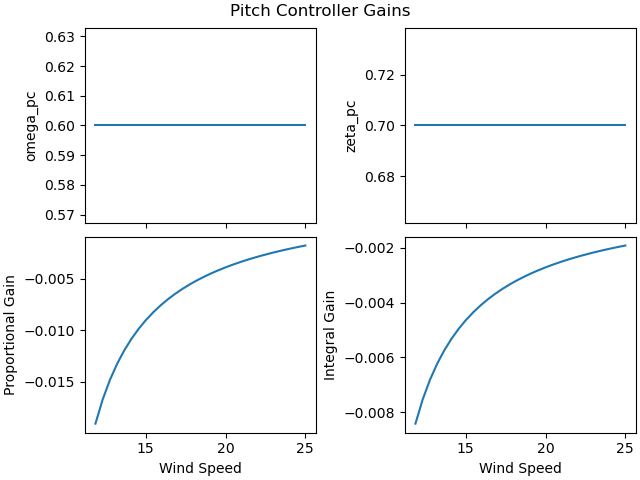
Write a controller input file (
'03_DISCON.IN')Plot gain schedule (
PC_GS_KPandPC_GS_KIversusPS_GS_angles):
3.4.4. 04_simple_sim
Demonstrate the simple 1-DOF wind turbine simulator with ROSCO
In this example:
Load turbine from saved pickle and tune a ROSCO controller
Run and plot a step wind simulation using 1-DOF model in
rosco.toolbox.simand the ROSCO dynamic library

Notes:
You must have a compiled controller in ROSCO/rosco/lib/, and properly point to it using the lib_name variable.
Using wind speed estimators in this simple simulation is known to cause problems. We suggest using WE_Mode = 0 in the DISCON.IN or increasing sampling rate of simulation as workarounds.
The simple simulation is run twice to check that arrays are deallocated properly.
3.4.5. 05_openfast_sim
Load a turbine, tune a controller, and run an OpenFAST simulation. In this example:
Load a turbine from OpenFAST
Tune a controller
Run an OpenFAST simulation
Note
You must have a compiled controller in ROSCO/rosco/lib/
3.4.6. 06_peak_shavings
Load saved turbine, tune controller, plot minimum pitch schedule In this example:
Load a yaml file
Load a turbine from openfast
Tune a controller
Plot minimum pitch schedule
3.4.7. 07_openfast_outputs
Plot some OpenFAST output data In this example:
Load openfast output data
Trim the time series
Plot some available channels
Note: need to run openfast model in ‘Test_Cases/5MW_Land_DLL_WTurb/’ to plot
3.4.8. 08_run_turbsim
Run TurbSim to create wind field binary In this example:
Leverage the run_openfast functionality to compile a turbsim binary
3.4.9. 09_distributed_aero
Tune a controller for distributed aerodynamic control In this example:
Read .yaml input file
Load an openfast turbine model
Read text file with rotor performance properties
Load blade information
Tune controller with flap actuator
Note
You will need a turbine model with DAC capabilites in order to run this. The curious user can contact Nikhar Abbas (nikhar.abbas@nrel.gov) for available models, if they do not have any themselves.
3.4.10. 10_linear_params
Load a turbine, tune a controller, export linear model In this example:
Load a turbine from OpenFAST
Tune a controller
Use tuning parameters to export linear model
3.4.11. 11_robust_tuning
Controller tuning to satisfy a robustness criteria
Note that this example necessitates the mbc3 through either pyFAST or WEIS
pyFAST is the easiest to install by cloning https://github.com/OpenFAST/openfast_toolbox and
running python setup.py develop from your conda environment
In this example:
setup ROSCO’s robust tuning methods for the IEA15MW on the UMaine Semi-sub
run a the standard tuning method to find k_float
run robust tuning to find omega_pc schedule satisfy a prescribed stability margin
Tune ROSCO’s pitch controller using omega_pc schedule
Plot gain schedule
The example is put in a function call to show the ability to load linear models in parallel
3.4.12. 12_tune_ipc
Load a turbine, tune a controller with IPC In this example:
Load a turbine from OpenFAST
Tune a controller with IPC
Run simple simulation with open loop control
3.4.13. 14_open_loop_control
Load a turbine, tune a controller with open loop control commands In this example:
Load a turbine from OpenFAST
Tune a controller
Write open loop inputs
Run simple simulation with open loop control
3.4.14. 15_pass_through
Use the runFAST scripts to set up an example, use pass through in yaml In this example:
use run_FAST_ROSCO class to set up a test case
3.4.15. 16_external_dll
Run openfast with ROSCO and external control interface IEA-15MW will call NREL-5MW controller and read control inputs
3.4.16. 17a_zeromq_simple
Run ROSCO using the ROSCO toolbox control interface and execute communication with ZeroMQ.
A demonstrator for ZeroMQ communication. Instead of using ROSCO with with control interface, one could call ROSCO from OpenFAST, and communicate with ZeroMQ through that. this_dir
3.4.17. 17b_zeromq_multi_openfast
Run multiple openfast simulations and execute communication with ZeroMQ.
3.4.18. 18_pitch_offsets
Run openfast with ROSCO and pitch offset faults Set up and run simulation with pitch offsets, check outputs
3.4.19. 19_update_discon_version
Test and demonstrate update_discon_version() function for converting an old ROSCO input to the current version
3.4.20. 20_active_wake_control
Run openfast with ROSCO and active wake control Set up and run simulation with AWC, check outputs Active wake control (AWC) with blade pitching is implemented in this example with two approaches as detailed below:
3.4.21. 21_optional_inputse_discon_version
Test and demonstrate update_discon_version() function for converting an old ROSCO input to the current version
3.4.22. 22_cable_control
Run openfast with ROSCO and cable control Set up and run simulation with pitch offsets, check outputs
ROSCO currently supports user-defined hooks for cable control actuation, if CC_Mode = 1. The control logic can be determined in Controllers.f90 with the CableControl subroutine. The CableControl subroutine takes an array of CC_DesiredL (length) equal to the ChannelIDs set in MoorDyn and determines the length and change in length needed for MoorDyn using a 2nd order actuator model (CC_ActTau). In the DISCON input, users must specify CC_GroupIndex relating to the deltaL of each control ChannelID. These indices can be found in the ServoDyn summary file (*SrvD.sum)
In the example below (and hard-coded in ROSCO) a step change of -10 m on line 1 is applied at 50 sec.
3.4.23. 23_structural_control
Run openfast with ROSCO and structural control Set up and run simulation with pitch offsets, check outputs
ROSCO currently supports user-defined hooks for structural control control actuation, if StC_Mode = 1. The control logic can be determined in Controllers.f90 with the StructrualControl subroutine. In the DISCON input, users must specify StC_GroupIndex relating to the control ChannelID. These indices can be found in the ServoDyn summary file (*SrvD.sum)
In the example below, we implement a smooth step change mimicing the exchange of ballast from the upwind column to the down wind columns
OpenFAST v3.5.0 is required to run this example
3.4.24. 24_floating_feedback
Run openfast with ROSCO and all the floating feedback methods Floating feedback methods available in ROSCO/ROSCO_Toolbox
Automated tuning, constant for all wind speeds
Automated tuning, varies with wind speed
Direct tuning, constant for all wind speeds
Direct tuning, varies with wind speeds
3.4.25. 25_rotor_position_control
Run ROSCO with rotor position control Run a steady simulation, use the azimuth output as an input to the next steady simulation, with different ICs
3.4.26. 26_marine_hydro
Run MHK turbine in OpenFAST with ROSCO torque controller
3.4.27. 27_power_ref_control
Run openfast with ROSCO and cable control Demonstrate a simulation with a generator reference speed that changes with estimated wind speed Set reference rotor speed as a function of wind speed (estimate in ROSCO)
3.4.28. 28_tower_resonance
Demonstrate tower resonance avoidance controller Set up and run simulation with tower resonance avoidance